
How to Check If Your Brand Appears in Google AI Overviews
By Franixo · · 10 minutes read
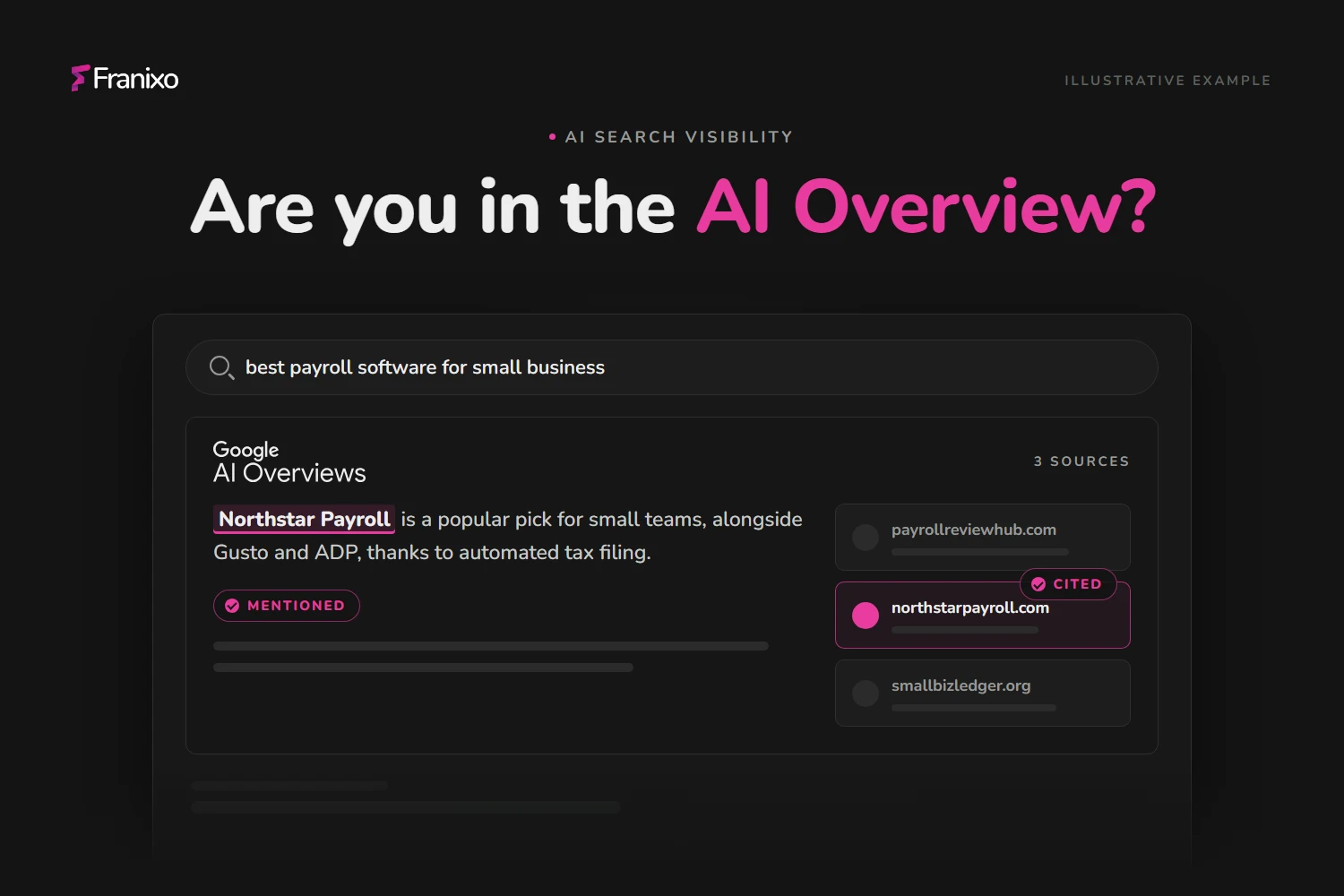
To check if your brand appears in Google AI Overviews, search the questions your buyers ask in a clean browser, expand any AI Overview and note whether your brand is named and whether your pages are among the cited links. Then confirm the picture in Search Console's Generative AI performance report, which shows how often links to your site appeared in AI Overviews and AI Mode. Neither method is complete on its own, so for a reliable answer you need a fixed set of queries checked on a schedule.
This guide covers what to check, how to check it by hand, what Search Console can and cannot tell you, and when manual checks stop being enough. If you want to know how to earn a place in AI Overviews in the first place, read our guide on how to show up in Google AI Overviews. This post is about measuring it.
What "appearing in an AI Overview" actually means
"Are we in AI Overviews?" sounds like a yes/no question, but it covers four different outcomes. Track them separately, because each one points to a different fix.
| Outcome | What you see | What it tells you |
|---|---|---|
| No AI Overview | Google shows a normal results page for the query | There is nothing to win for this query right now. Google decides per query whether to show one. |
| AI Overview, brand not named | An AI summary appears, but it names competitors or no brands at all | You have a visibility gap: buyers get an answer without you in it. |
| Brand mentioned | Your brand name appears in the generated text | Google's summary includes you, but it may still credit other sites as sources. |
| Your page cited | One of your URLs appears among the AI Overview's links | Google used your page to support the answer. This is the outcome Search Console can count. |
A mention and a citation are not the same thing. Your brand can be named while the links point to review sites and competitors, and your page can be cited for a general fact without your brand being recommended. Record both.
How to check manually, step by step
Manual checks are the fastest way to get a first impression. To make them useful, run them the same way every time.
- Write down 10–20 real buyer questions. Use the questions customers ask before buying: "best [category] for [use case]", "[your brand] vs [competitor]", "how to [problem your product solves]". Include your brand name in a few of them and leave it out of most, because unbranded questions are where buyers discover new options.
- Use a clean browser session. Open a private window, or a browser profile that isn't signed in to Google, so your own search history has less influence. Your location still matters, so note where you're searching from.
- Search each question and expand the AI Overview. If one appears, click "Show more" so you can read the full text, and open the list of links and sources.
- Record what you see. For each query, note whether an AI Overview appeared, whether your brand was named, which competitors were named, and which domains were linked. A simple spreadsheet with one row per query and date is enough.
- Repeat on mobile and in each market you sell to. Results can differ between devices, countries and languages, so a check from your office only describes what one searcher saw.
- Repeat the same list on a fixed schedule. A single check is a snapshot. AI Overviews can change from day to day for the same query, so trends only become visible when you compare the same questions over several weeks.
Save a screenshot of every AI Overview that mentions you or a competitor. Reading old screenshots side by side is often the quickest way to spot that a competitor started getting cited.
What Google Search Console can (and can't) tell you
Search Console is the only first-party data Google gives you about AI Overviews, so start there. There are two places to look.
The Generative AI performance report
In June 2026 Google introduced a dedicated report, and as of 31 August 2026 it is available to all sites. In Search Console, open Performance and choose the Generative AI performance report (Search). It shows impressions: how many times links to your site were shown to a user in a generative AI feature on Google Search, covering AI Overviews and AI Mode.
You can break that number down by page, country, device and date. That makes the report good at answering "which of our pages does Google use as a source in AI answers, and is that growing?"
It has clear limits for brand monitoring:
- It counts links, not mentions. If an AI Overview names your brand but links only to other sites, the report shows nothing.
- It doesn't show which queries triggered the impression. The documented dimensions are pages, countries, devices and dates, so you can't see which buyer questions you appear for.
- It doesn't show competitors. You only see your own property.
- It only appears once your site has enough generative AI impressions. Small or new sites may not see it at all.
The standard Performance report
Clicks and impressions from AI Overviews are also included in the regular Search performance report under the Web search type, mixed in with everything else. Google counts all links in an AI Overview at the position of the AI Overview itself, so an average position in this report doesn't tell you whether a query had an AI Overview. There is no filter that isolates AI Overview traffic in this report.
A third signal: the Search generative AI control
Search Console also has a Search generative AI setting (under Settings) that lets a site opt out of AI Overviews, AI Mode and generative AI features in Discover. If your pages never show up as sources, check that nobody on your team turned this on. Google says the setting isn't used as a ranking signal for the rest of Search, and excluded sites receive no impressions or traffic from these features.
Where manual checks stop working
Manual checks answer "did we show up for this query, on this device, today?" They struggle with the questions that actually guide decisions:
- Scale. Twenty queries across two markets and two devices is already 80 checks per round. Most teams stop after a few weeks.
- Consistency. Different people search from different locations and accounts, so their results aren't comparable.
- Competitors. You need to record every brand named in every answer to know whether a competitor is gaining share.
- History. Without a dated log you can't tell whether a content update helped, or whether an AI Overview simply stopped appearing for that query.
Search Console fills part of the gap with first-party impression data, but it can't tell you which questions you appear for or who appears instead of you.
How ongoing AI Overviews monitoring works
Monitoring tools automate the manual routine above. The general approach is the same across tools:
- You define a set of prompts: the questions buyers ask, grouped by topic and market.
- On a schedule, the tool runs each prompt against Google in the chosen country and language, and stores the AI Overview text and its cited links.
- Each answer is checked for your brand, your domain and your competitors.
- Results are aggregated into rates you can compare over time: how often an AI Overview appears, how often you're mentioned, how often your domain is cited, and how you compare with competitors.
In Franixo, prompt tracking runs your prompts on a weekly scan, and on the Growth and Agency plans it also checks Google AI Overviews and Google AI Mode. For each prompt, Franixo records whether an AI Overview appeared, whether your brand and competitors were mentioned, and which pages were cited. Those citations feed citation analysis, so you can see which domains Google relies on when it answers questions in your category.
Some details matter when you read the numbers:
- "No AI Overview shown" is its own result. It counts as a real negative result in the rates, separate from cases where Google showed an AI Overview without naming you. Failed collections are left out instead of being counted as zeros.
- Google AI features are reported separately. They are not mixed into the AI Visibility Score or with Gemini results, because Google's search features and the Gemini app are different products.
- It's a sample, not every searcher's screen. Franixo reads one Google results page per prompt per scan in your chosen country. It shows the direction and the gaps reliably, but it is not a census of every result shown to real users.
Used together, the two sources answer different questions: Search Console tells you how often Google actually showed your links, and prompt monitoring tells you which questions you appear for, which you're missing, and who appears instead.
Turning what you find into action
Once you know where you stand, the next step depends on which outcome you found:
- No AI Overview for your key queries: keep investing in classic rankings. Our comparison of GEO and SEO explains why the two still go hand in hand.
- AI Overview appears, but you're missing: look at which pages are cited instead and what they cover that yours don't.
- You're mentioned but not cited: strengthen the page that should support the claim so it is crawlable, indexed and answers the question directly.
Our guide on how to show up in Google AI Overviews covers those improvements in detail.
Frequently Asked Questions
How can I see if my website is featured in Google AI Overviews?
Open Search Console and go to Performance > Generative AI performance report (Search). It shows how many times links to your site appeared in AI Overviews and AI Mode, broken down by page, country, device and date.
To see which questions you appear for, search your target queries in a clean browser session and check the AI Overview's links, or use a monitoring tool that runs the same queries on a schedule.
Does Google Search Console show AI Overview queries?
Not in the Generative AI performance report. Google documents pages, countries, devices and dates as its dimensions, without queries.
AI Overview clicks and impressions are also included in the standard Performance report under the Web search type, but they are mixed in with regular results and there is no filter to isolate them.
Why do I see different AI Overviews than my colleagues?
AI Overviews can differ by location, language, device and time, and Google decides for each search whether to show one at all.
For comparable results, use a fixed list of queries, search from the same market and device each time, and record the date of every check.
Is being mentioned in an AI Overview the same as being cited?
No. A mention means your brand name appears in the generated text. A citation means one of your pages appears among the AI Overview's links.
Search Console only counts citations (links). To track mentions, and which competitors are named alongside you, you need to read the answers themselves, manually or with a monitoring tool.
How often should I check my AI Overviews visibility?
Weekly is a practical rhythm for most brands. AI Overviews can change for the same query from one day to the next, so a single check says little.
What matters is comparing the same set of queries over several weeks and noting when you publish changes, so you can see whether your visibility moved after them.